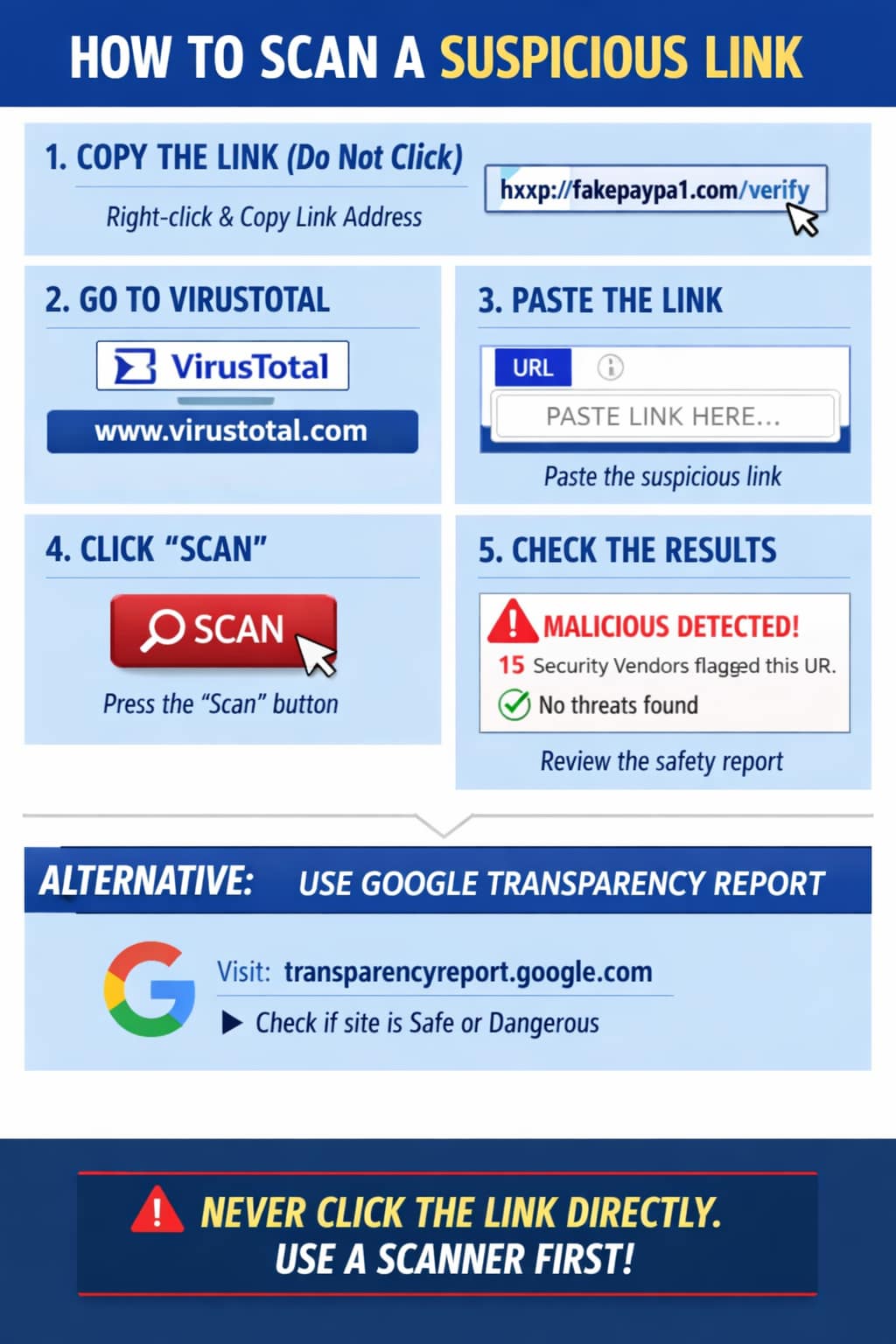

🔍 How to Check a Suspicious Link
- Hover before clicking: Place your mouse over the link (without clicking) to see the actual URL. If it looks strange or mismatched with the sender, it’s likely malicious.
- Use a link scanner: Free online tools like VirusTotal, Google Transparency Report (transparencyreport.google.com in Bing), or URLVoid let you paste the link and check if it’s flagged as unsafe.
- Check for HTTPS: Legitimate sites usually start with
https://. Scam links often use misspelled domains (e.g.,paypa1.cominstead ofpaypal.com). - Shortened links caution: If the scammer uses a shortened link (like bit.ly), expand it first using a service like CheckShortURL.
- Look for red flags: Extra numbers, strange characters, or domains that don’t match the company name are warning signs.
⚠️ Safety Tips
- Never click the link directly — always copy and paste into a scanner.
- Do not download files or enter personal details on suspicious sites.
- Report the link to your email provider, messaging app, or directly to the Indian Cyber Crime Portal (https://cybercrime.gov.in) if you’re in India.
🛡️ Step‑by‑Step Guide (VirusTotal Example)
- Copy the link (do not click it)
- Right‑click the link → choose Copy Link Address.
- Or highlight it → press Ctrl+C.
- Open VirusTotal
- Go to https://www.virustotal.com in your browser.
- Paste the link
- On the homepage, select the URL tab.
- Paste the suspicious link into the box (Ctrl+V).
- Scan the link
- Click Search/Scan.
- VirusTotal will check the link against dozens of security databases.
- Read the results
- If multiple engines flag it as malicious, it’s unsafe.
- If it shows clean, still be cautious—scammers often use new domains not yet flagged.
🌐 Alternative: Google Transparency Report
- Visit Google Safe Browsing Check (transparencyreport.google.com in Bing).
- Paste the suspicious link.
- It will tell you if Google has detected phishing, malware, or unsafe content.
⚠️ Important Safety Notes
- Never open the link directly. Always use scanners.
- Do not download files or enter personal info on suspicious sites.
- If confirmed malicious, report it to your email provider or the Indian Cyber Crime Portal.


 By
By